# Mobile app
RespireBien also works as a phone app: the same site, but installed on your home screen, without the App Store or Google Play. Once installed, it runs full-screen, like a regular app.
## Installation
Tap **Install app** in the prompt that appears on your phone.
On **Android (Chrome)**, confirm the installation in the window shown by the browser.
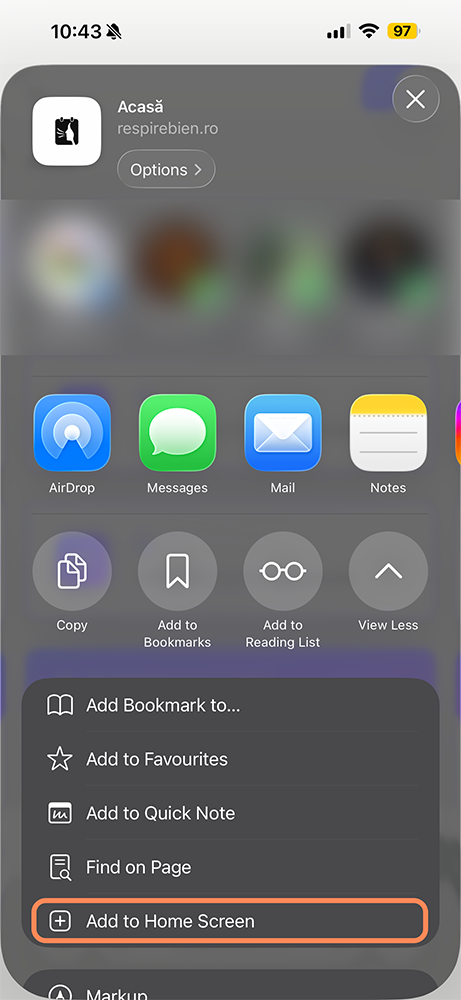
On **iPhone / iPad**, the app shows you the steps:
1. Tap the share button  2. Scroll and choose **Add to Home Screen**.
3. Confirm with **Add**.
## Notifications and offline mode
### Notifications
Once installed, the app can send notifications straight to your phone so you never miss a session: one the day before and one 15 minutes before.
You can configure them from **[Notifications](/settings/notifications)**.
2. Scroll and choose **Add to Home Screen**.
3. Confirm with **Add**.
## Notifications and offline mode
### Notifications
Once installed, the app can send notifications straight to your phone so you never miss a session: one the day before and one 15 minutes before.
You can configure them from **[Notifications](/settings/notifications)**.
For details, see the **[Notifications](/help/notifications)** guide.
### Offline mode
The app keeps a private copy of the current month's appointments and notes on your phone, so you can check them anytime, even without an internet connection.
> [!warning]
> Offline mode is read-only — you can see the saved information, but you can't edit it.